
تكنولوجيا الإعلام والاتصال
Topic outline
-
01 University Mohamed Seddik Benyahia, Jijel 02 Faculty L'annexe de l'école supérieure des enseignants 03 Department Political Science 04 Year (2025-2026) 05 Target Group First year, English Teacher. 06 The Course Technology of Information and Communication 07 Unit Exploratory Unit 08 Weekly Range One hour half/ week 09 Semester Range 14 weeks 10 Coefficient 4 11 Course Timing Every Monday (12:30- 14:00) 12 Lecturer in charge Dr. Faouzia ZERAOULIA 13 Contact information of lecturer in charge zeraoulia-faouzia@univ-jijel.dz
https://scholar.google.fr/citations?user=barfLUIAAAAJ&hl=fr -
Lesson
Course Title
Activity
TP (Travaux Pratiques)
01
Online Learning
Introduction to e-learning platforms, benefits, and classroom rules
Log into an LMS (Google Classroom / Moodle) and submit an assignment
02
How to Write an Official Email
Two writing exercises (subject line, greeting, body, closing)
Compose and send a professional email to your instructor
03
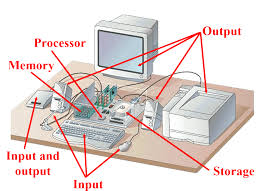
Understanding Computer Systems
Two exercises on identifying hardware and software
Label computer parts and classify input/output devices
04
How to Use Zoom
Video recording through Zoom platform
Host a Zoom meeting, share your screen, and record a session
05
File Management
Quiz on file organization (QCM)
Create folders, name files correctly, and save different file types
06
Clouding Computing
(Add activity)
(Add practical task)
07
Information Security
(Add activity)
(Add practical task)
08
(To be completed)
(Add activity)
(Add practical task)
09
(To be completed)
(Add activity)
(Add practical task)
10
(To be completed)
(Add activity)
(Add practical task)
11
(To be completed)
(Add activity)
(Add practical task)
12
(To be completed)
(Add activity)
(Add practical task)
14
(To be completed)
(Add activity)
(Add practical task)
-
First: Developing Digital Competence and Literacy: The main goal is to develop the practical skills and critical understanding competences that are necessary to use technology effectively and ethically.
- To promote proficiency in using basic and advanced ICT tools, including operating systems, word processors, spreadsheets, presentation software, and essential web applications.
- To teach students how to access, evaluate, manage, and synthesize digital information efficiently.
- To cultivate the ability to critically evaluate the vast amount of online information, identify fake news, and understand the credibility and bias of digital sources.
- To instill an understanding of responsible and ethical behavior online, including cybersecurity, data privacy, intellectual property rights, and appropriate social conduct.
- To allow students to learn at their own pace and style through diverse digital resources, adaptive software, and multimedia content (videos, simulations, interactive quizzes).
- To enable students to work together on projects regardless of location using cloud tools, virtual classrooms, and collaborative platforms, fostering teamwork and communication skills.
- To provide students with tools (e.g., coding platforms, design software, video editors) to create new digital content and find innovative solutions to problems
- To foster core skills essential for the modern economy: problem-solving, critical analysis, creativity, and communication, all of which are amplified by technology.
- To develop the digital foundation necessary for virtually any modern career, from marketing and finance to science and engineering.
- To ensure all students, regardless of their socio-economic background, have the opportunity to acquire these essential technological skills, promoting equity and access to future opportunities.
- To promote proficiency in using basic and advanced ICT tools, including operating systems, word processors, spreadsheets, presentation software, and essential web applications.
-
-
-

-
Course File
-
Homework AssignmentOpened: Tuesday, 18 November 2025, 12:00 AMDue: Wednesday, 31 December 2025, 12:00 AM
Complete the uplaoded form
-
-

-
Writing Official Emails File
-
Homework 01 AssignmentOpened: Tuesday, 14 October 2025, 12:00 AMDue: Wednesday, 22 October 2025, 12:00 AM
-
Homework 02 AssignmentOpened: Monday, 13 October 2025, 12:00 AMDue: Wednesday, 19 November 2025, 12:00 AM
-
-
-
Understanding the Computer System File
-
Home work 01 AssignmentOpened: Sunday, 19 October 2025, 12:00 AMDue: Friday, 28 November 2025, 12:00 AM
Exercise : Setting up Coursera
Create Your Coursera Account and choose courses that adress education. You can include your answer as either a pdf or a word file.
-
Homework 02 AssignmentOpened: Sunday, 19 October 2025, 12:00 AMDue: Monday, 10 November 2025, 12:00 AM
Exercise : Setting up FutureLearn Account
Create Your Future Learn Account and choose courses that adress education. You can include your answer as either a pdf or a word file.
-
-
-
Homework AssignmentOpened: Sunday, 2 November 2025, 12:00 AMDue: Monday, 8 December 2025, 12:00 AM
Watch the lecture and summarize the main ideas:
https://www.youtube.com/watch?v=AyogyD7vXbw
-
Homework 02 AssignmentOpened: Sunday, 2 November 2025, 12:00 AMDue: Monday, 1 December 2025, 12:00 AMCreate a free Zoom account using your email address, start a new meeting, and record a short video of yourself introducing who you are. In the video, clearly state your full name, your course or program, where you come from, a few of your hobbies or interests, and what you hope to achieve this academic year. The video should be about one to two minutes long. After recording, stop the meeting, save the video, rename it using your full name, and submit the file or link to your teacher as instructed.
-
Visual Explanation File
-
-

-
Course File
-
Interactive Exercise Interactive Content
-
Visual Explanation File
-
Homework AssignmentOpened: Tuesday, 18 November 2025, 12:00 AMDue: Wednesday, 31 December 2025, 12:00 AM
Create your own CV using Microsoft PowerPoint. Include your personal information, education, skills, experience, and any achievements or projects. When you finish designing your CV, save the PowerPoint file and then export or save it as a PDF. Upload the PDF version for submission.
-
-
-
Course File
-
-
-
Course File
-
-
-
Book Introduction AssignmentOpened: Sunday, 30 November 2025, 12:00 AMDue: Wednesday, 7 January 2026, 12:00 AMAfter reading the main introduction of the both books, conclude the general idea of each one.
-
-
-
Exam File
-
-
-
-
-
-
-
-
-
-
-
-
-